
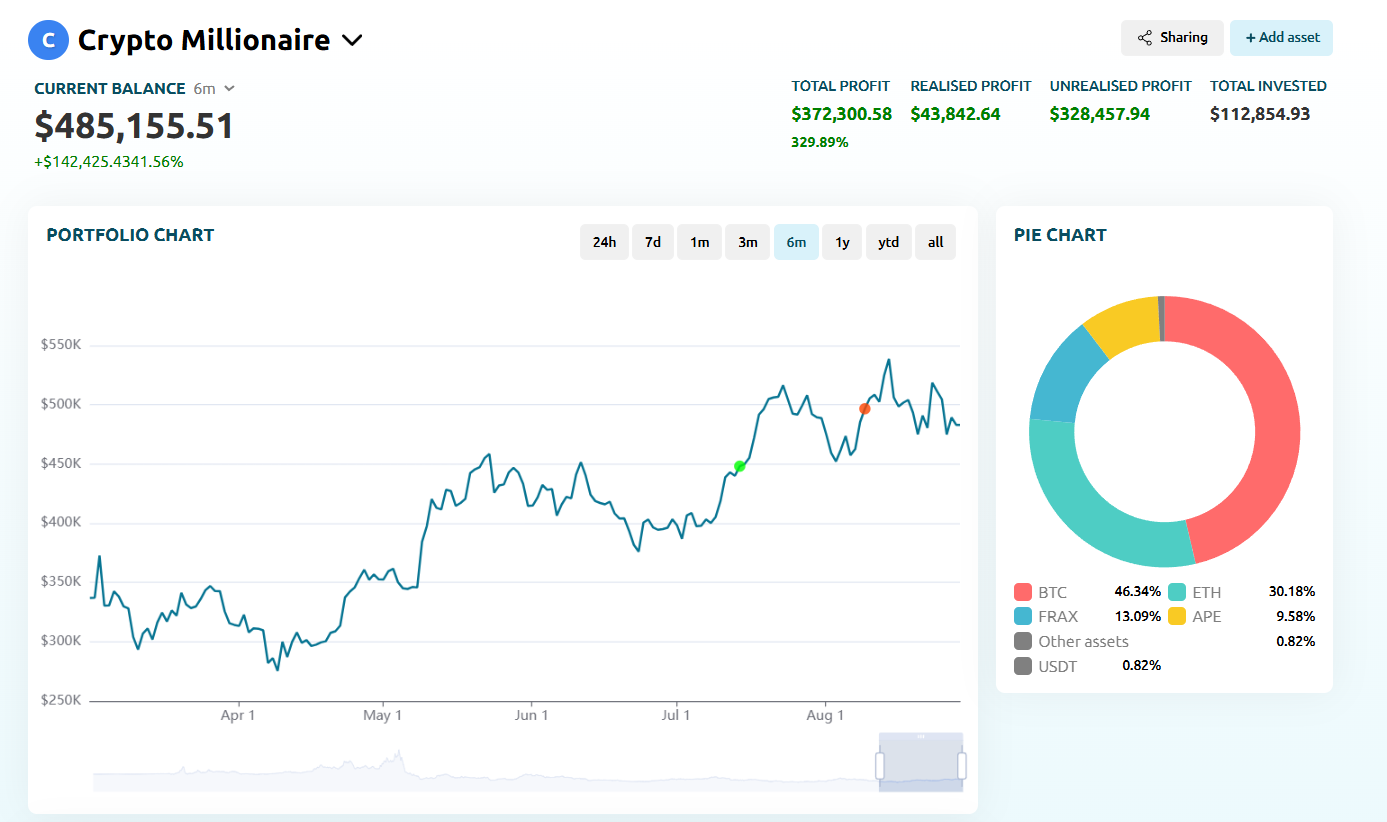
The crypto market never sleeps – and with thousands of assets, DeFi protocols, and NFTs emerging daily, keeping track of your investments manually is nearly impossible. The best portfolio tracker helps you:
- Monitor real-time asset prices and allocations.
- Analyze profit and loss (P&L) performance.
- Automate tracking across exchanges and wallets.
- Prepare accurate tax reports and optimize strategies.
Why You Need a Crypto Portfolio Tracker in 2026
Whether you’re an active trader or a long-term investor, choosing the right tool can save you hours of work and prevent costly mistakes. Below are the best portfolio trackers in 2026, starting with our #1 pick – the Coindataflow Portfolio Tracker.
1. Coindataflow Portfolio Tracker
Try Coindataflow Portfolio Tracker →
The Coindataflow Portfolio Tracker is designed for serious traders and investors who want professional-grade analytics and secure data handling. It combines a clean interface, detailed performance tracking, and future-proof development – making it our top recommendation for 2026.
Key Features
- Advanced P&L analytics – instantly see how each asset and your overall portfolio are performing.
- Bank-level security – all connections are read-only, ensuring your funds remain safe.
- Cross-platform access – track your crypto and stocks in one place.
- Upcoming features – automated wallet syncing, diversification insights, price alerts, and integrated tax reporting.
Why It Stands Out
Unlike many trackers focused only on retail users, Coindataflow is built for professional portfolio management. You get powerful analytics without sacrificing usability, and its development roadmap guarantees even more automation and reporting tools in the near future.
How to Use Coindataflow Portfolio Tracker
Step 1 – Create a New Portfolio
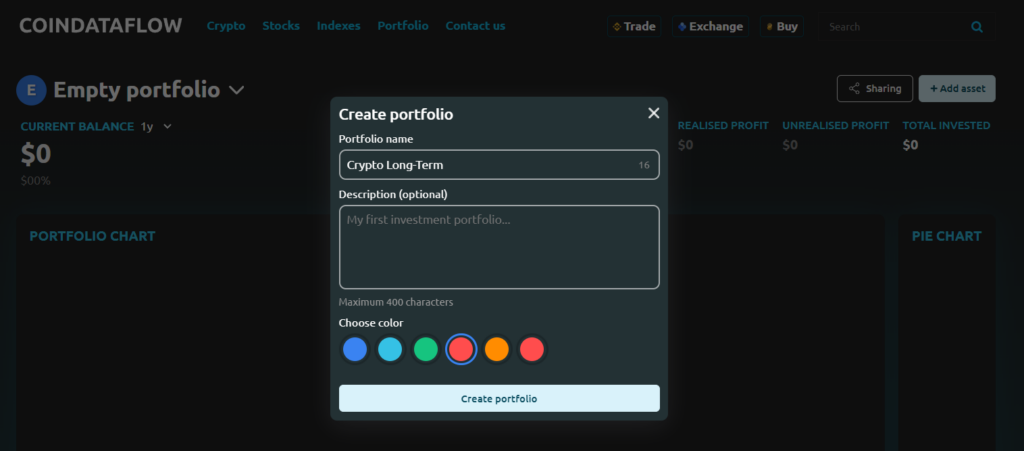
Go to the portfolio tracker page, (you can sign in or test portfolio without login) click arrow near Empty portfolio “Add portfolio”
- Name your portfolio (e.g., “Crypto Long-Term”)
- Add descripton (optional)
- Choose color
- Save your settings by clicking “Create portfolio” button
Step 2 – Add New Assets
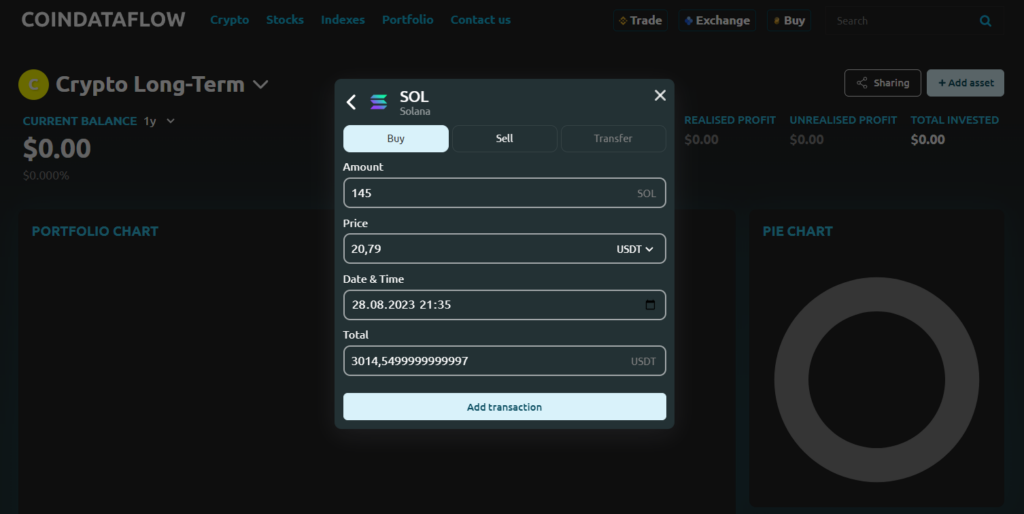
Click “Add Asset”, search for your token (e.g., ETH, SOL), and enter:
- Quantity purchased
- Purchase price or total investment amount
- Date of purchase
Step 3 -Check Portfolio Performance
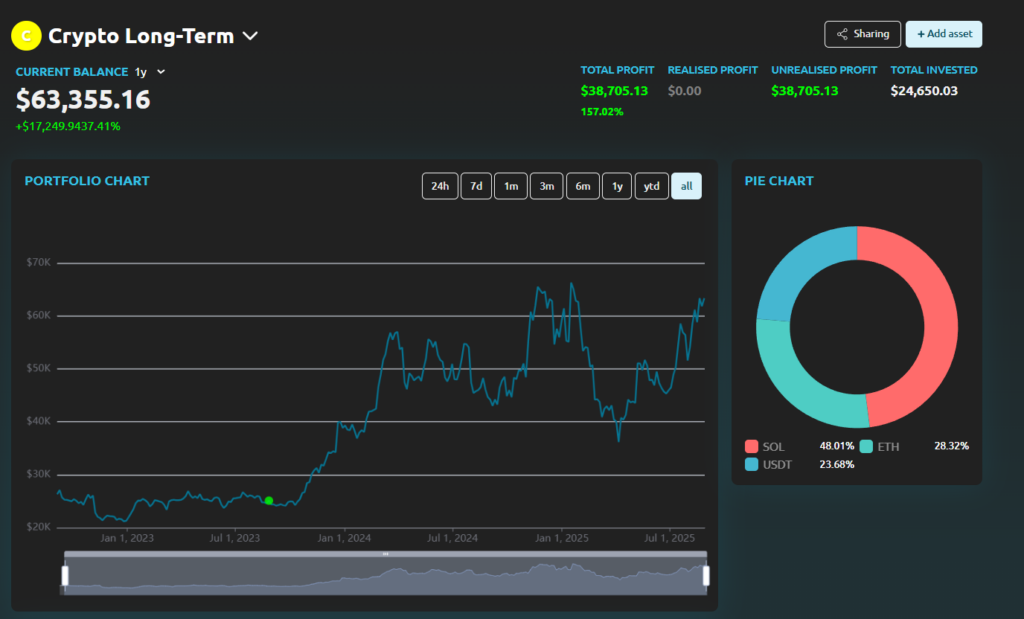
The dashboard automatically calculates:
- Current value vs. investment
- Profit/Loss per asset
- Portfolio diversification
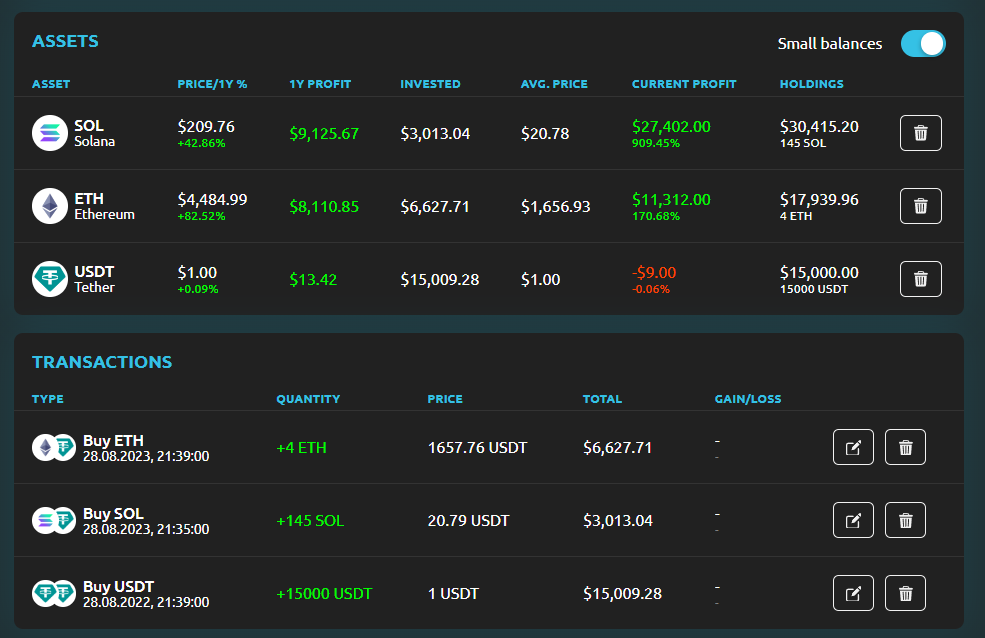
This lets you instantly see how your portfolio is doing -without complex spreadsheets.
2. CoinStats
CoinStats crypto portfolio tracker supports over 8,000 cryptocurrencies with mobile and web access. It offers:
- Price alerts and integrated news feed.
- Direct trading inside the app.
- A premium plan for unlimited wallets and exchanges.
It’s a great balance between usability and functionality, ideal for everyday crypto investors.
3. Delta
Delta is loved for its clean interface and detailed transaction analytics. Key benefits include:
- Support for hundreds of exchanges and wallets.
- Multi-asset tracking (crypto, NFTs, stocks).
- Detailed P&L analysis and portfolio history.
It’s perfect for users who want clarity and precision.
4. CoinMarketCap
CoinMarketCap is one of the most popular free trackers:
- Wide coverage of crypto assets.
- Manual portfolio tracking.
- Beginner-friendly interface, though limited in automation.
It’s a solid option if you’re just starting out.
5. CoinGecko
CoinGecko combines robust tracking with research tools:
- Coverage of 16,000+ cryptocurrencies.
- API, widgets, and mobile app sync.
- Strong analytics suitable for both casual users and market researchers.
6. Blockpit
Blockpit focuses on compliance and reporting:
- Integrated DeFi and NFT tracking.
- Built-in tax optimization tools.
- A free version plus premium plans for professionals.
Great for investors who need detailed tax reports alongside performance data.
7. CoinTracker / CoinTracking
These platforms are highly advanced and tax-oriented:
- Automated imports from 300+ exchanges and wallets.
- In-depth reporting for high-volume traders.
- Multiple accounting methods for tax compliance.
They’re best suited for users who prioritize automation and regulatory accuracy.
8. Shrimpy / Altrady
These niche tools are built for active traders:
- Shrimpy focuses on social trading and strategy copying.
- Altrady is a multi-exchange management tool with strong real-time analytics.
While less universal, they’re excellent for specialized use cases.
Final Thoughts
Choosing the right crypto portfolio tracker depends on your needs:
- For professional analytics and future-proof features: Coindataflow Portfolio Tracker
- For DeFi/NFT investors: CoinStats or Blockpit
- For traders who want multi-exchange management: Delta or Altrady
- For beginners: Coindataflow or CoinMarketCap or CoinGecko
In 2025, the best portfolio tracker isn’t just about showing balances – it’s about saving time, staying secure, and making smarter investment decisions. And that’s why Coindataflow stands out as the top pick.
Get started with Coindataflow Portfolio Tracker →